Safety in Tool Calling
The moment a model can trigger actions, it can trigger harmful actions — by mistake, or because an attacker steered it there through prompt injection. Tool calling is where an LLM application's blast radius lives. As an architect, you treat the model's tool requests the way you'd treat any request arriving from outside your trust boundary: never trusted, always checked.
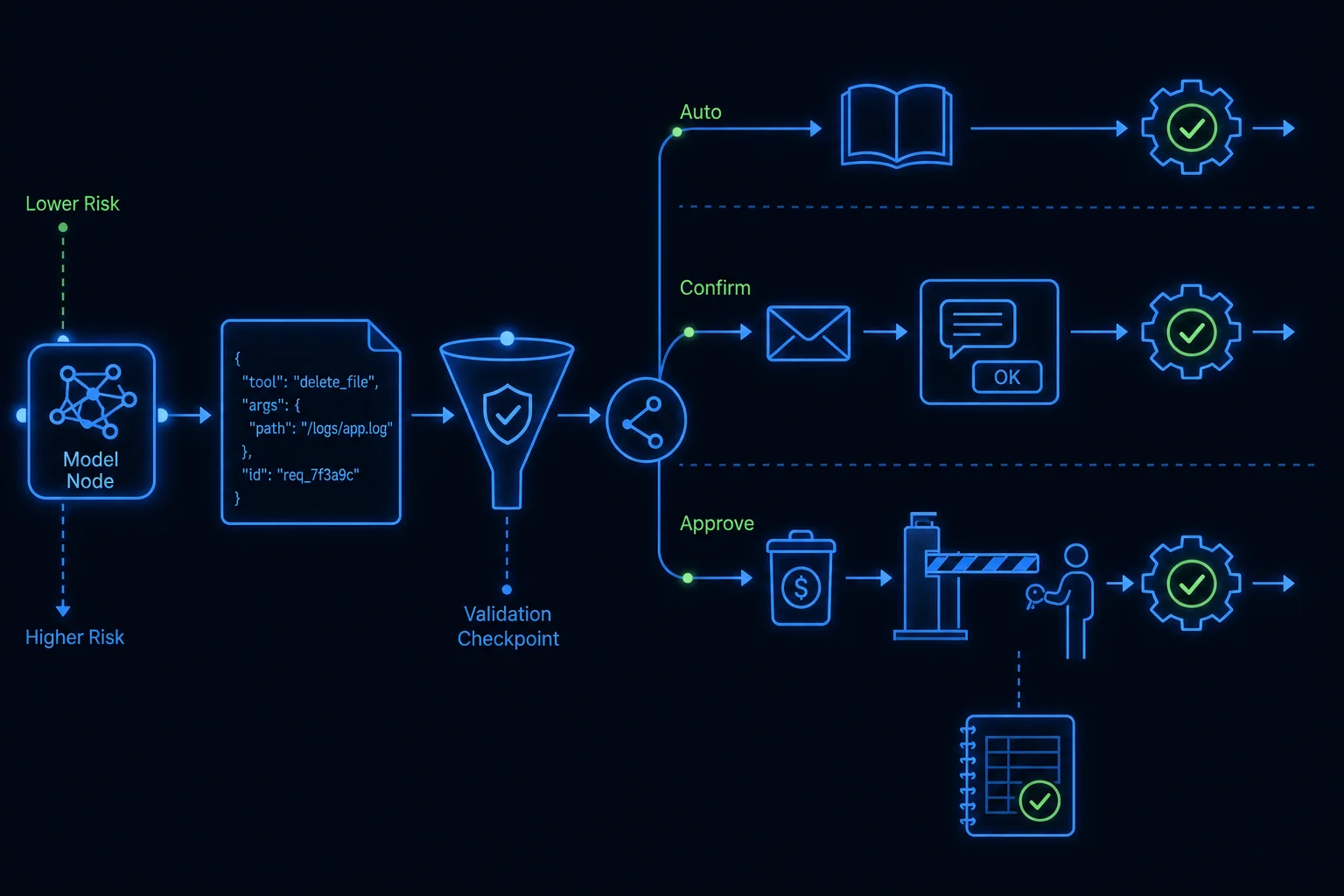
Treat every tool request as untrusted input
The JSON arguments the model produces are not vetted just because the model produced them. The model may have been manipulated by injected text in a document it read, or it may simply be wrong. So:
- Validate every argument against the schema and your business rules before executing. A
userIdmust exist and belong to the requesting session; adueDatemust be a real future date; anamountmust fall within sane bounds. - Scope by the user's permissions, not the model's confidence. Run the tool under the authenticated user's authorization. If that user can't delete the record, neither can the model acting on their behalf — enforce this in your code, never assume it.
- Treat tool outputs as untrusted too. A web page or document your tool fetched can carry injected instructions. When you feed that result back to the model, it's data, not commands — the same posture from Module 3's prompt-injection lesson.
Allow-list, and never auto-execute the irreversible
Two rules that keep you out of the headlines:
- Allow-list tools per context. A given conversation gets only the tools it needs. The Tutor gets none; an admin assistant gets a curated few. There is no "all tools available by default."
- Never let the model auto-execute destructive or irreversible actions. Deleting records, moving money, sending external communications, deploying to production — these require a human approval step between the model's request and the actual execution. The model can propose "refund $400"; a person clicks confirm.
The pattern is a tiered policy:
- Read-only / reversible (look up a lesson, draft text) → execute automatically.
- Consequential (send an email, change enrollment) → require explicit confirmation.
- Destructive / irreversible (delete data, financial moves) → human approval, audit-logged, ideally behind a second authorization.
Defense in depth
No single control is enough; layer them. Log every tool call — inputs, outputs, who approved what — for audit and incident response. Rate-limit tools to cap damage from a runaway loop. Fail closed: on a validation error or low confidence, refuse rather than guess. And keep the set of action-capable tools as small as the task allows — the safest tool is the one you didn't expose.
LyraLearn applies exactly this split: ingestion and admin tools run under staff permissions with approval gates and full audit logs, while the student Tutor — the surface most exposed to untrusted input — is given no tools at all. Lesson 4 explains why that last choice is a feature, not a limitation.