Real-World Sources — Templates, CMS, and Code
The clean examples make RAG look easy: take a document, chunk it, embed it. Real sources are
messier — Razor views (.cshtml), WordPress pages, and source code are all containers that
mix meaningful text with markup, directives, and boilerplate. The architect's rule: never embed
the container — embed what it means. And what it means depends on what you're searching for.
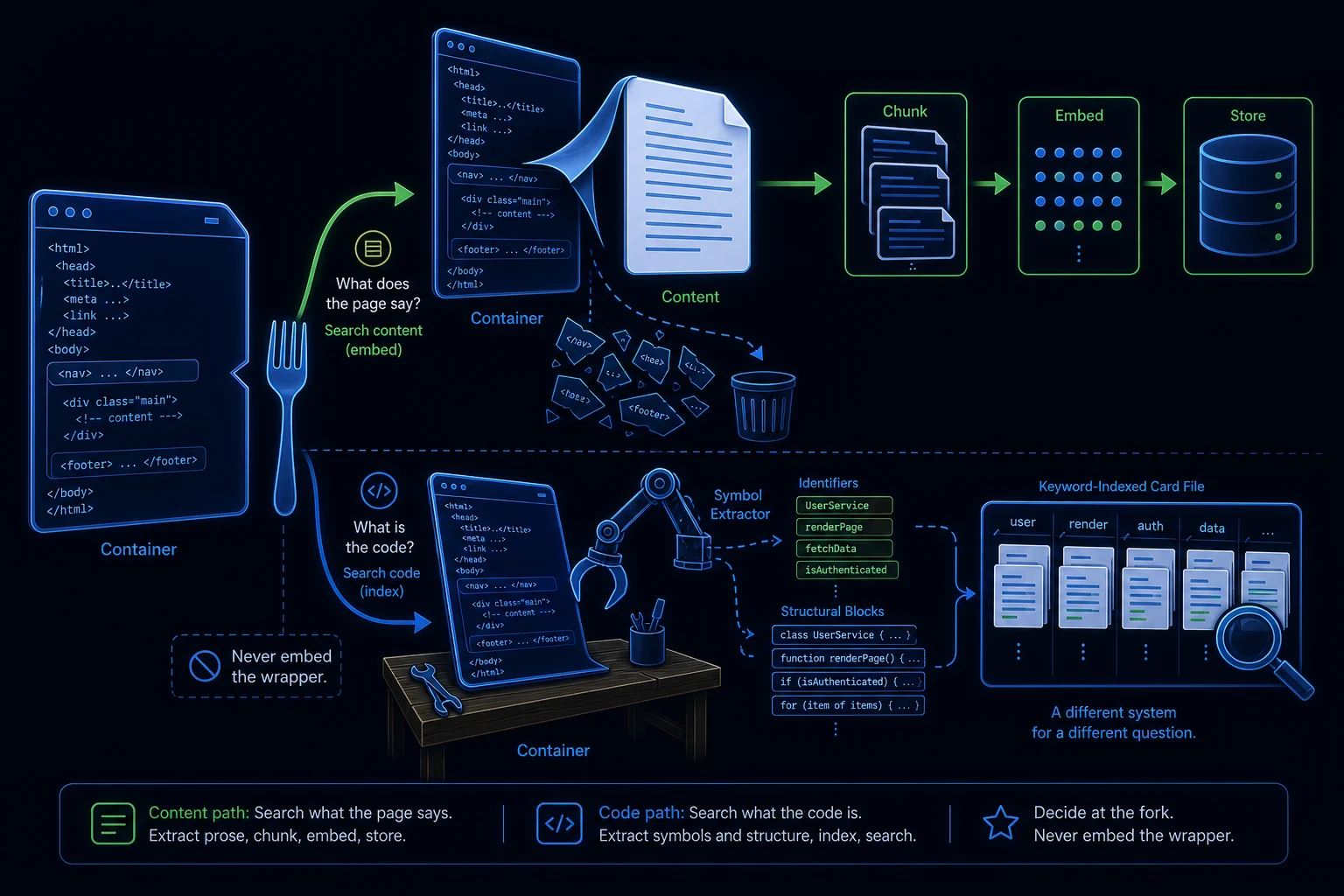
Don't search the template — search its content
A .cshtml file is HTML + Razor (@model, @{ }, tag helpers, layouts) + prose. Embedding the
raw file floods your vectors with markup and C# tokens and retrieves noise. The same is true of a
CMS page wrapped in nav, footer, and theme chrome. So the first question is always: what is the
user actually looking for here — the content the page shows, or the code itself? Those are two
different systems.
Scenario A — searching the content a page presents
This is the usual knowledge-base case (and the WordPress-sync pattern from the capstone). You build an ingestion pipeline and never query the live page during a conversation:
- Extract clean text. Strip Razor/HTML/chrome. For static views a parser is enough; for dynamic pages whose content comes from a database at render time, ingest the rendered output or the underlying data source — the template alone doesn't contain the content.
- Keep structure + metadata — headings, the page's route/URL, title, last-modified — to power citations, filtering, and change detection.
- Chunk (heading-aware), embed, and also index keywords for hybrid search; re-ingest only pages whose content hash changed.
LyraLearn does exactly this to itself. The lesson you're reading is rendered from a
.cshtmlview, but the knowledge base contains none of that template — it ingests the lesson markdown (the source of truth) and embeds that. That is why the Tutor can explain RAG but correctly refuses questions about.cshtmlhandling: the template isn't in the corpus, by design.
Scenario B — searching the code itself
"Which view renders the login form?" is code search, a different beast — and it's where naive vector RAG most often disappoints:
- Lexical beats semantic. Code relevance hinges on exact tokens — class names,
@modeltypes, routes, partial names. Embeddings blur those, so weight keyword/BM25 (or AST/symbol indexing) heavily and use vectors only for fuzzy intent ("the page that shows the cart"). - Chunk by structure, not character count — per method, class, or view — and carry file path and symbol names as metadata.
- Many answers are multi-hop. "How is X handled" usually spans controller → service → view → config, which one-shot top-k retrieval can't assemble. Iterative/agentic retrieval (search → read → follow references → repeat) outperforms a single vector lookup.
The takeaway
"How do I search .cshtml?" is the wrong question. Separate content from container, decide whether you want
meaning (extract rendered text) or code (symbols + structure), and tune vector-vs-keyword
weighting to match. Get that framing right and the messy real-world sources stop being a problem.