Vision and Document Intelligence
If multimodal LLMs are the generalists, vision and document services are the production workhorses. Every enterprise sits on a mountain of scans, forms, and photos, and turning them into structured data is one of the most reliably valuable AI workloads — and one of the most heavily examined on AI-102.
OCR and image analysis
OCR (optical character recognition) converts printed or handwritten text in images into machine-readable text. On Azure this is the Read API in Azure AI Vision; every major cloud has an equivalent. Beyond OCR, vision services offer image analysis — tagging, captioning, object detection, and face detection — each as a scoped, priced API call rather than an open-ended model conversation.
The architectural appeal is predictability: fixed input, schema'd JSON output, per-transaction pricing, and no prompt engineering. For "read the text off this image" at volume, a vision service beats an LLM on cost and latency by a wide margin.
Prebuilt vs custom extraction models
Azure AI Document Intelligence (formerly Form Recognizer) goes a level deeper than OCR: it understands documents — key-value pairs, tables, selection marks — not just characters. The exam distinction to internalize is prebuilt vs custom models:
- Prebuilt models handle common document types out of the box: invoices, receipts, identity
documents, tax forms, contracts. No training data needed — you post a PDF, you get typed fields
back (
InvoiceTotal,VendorName, line items). - Custom models are trained on your document layout when no prebuilt fits. You label as few as five sample documents, and the service learns to extract your fields. Custom template models suit fixed layouts; custom neural models generalize across visual variations of the same document class.
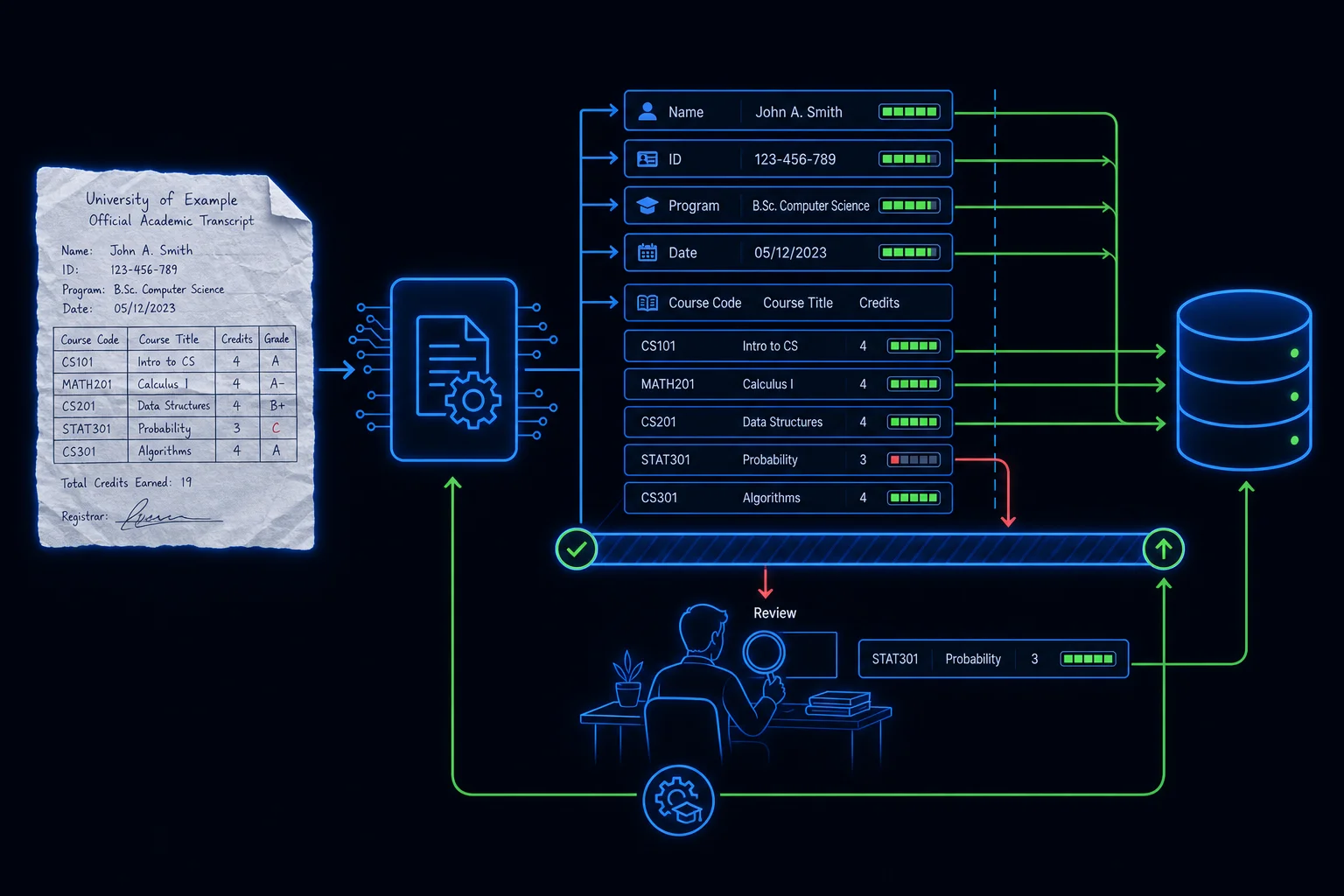
A concrete public-sector example: a credential-evaluation workflow that receives scanned academic transcripts. A custom extraction model pulls course names, credit hours, and grades from each transcript into structured rows a caseworker (or a downstream RAG system) can actually use — exactly the direction the teacher-credential assistant demo related to this platform points, where transcript intake is a manual bottleneck today.
Confidence scores and the human loop
Every extracted field comes with a confidence score (0–1). Treat it as a routing signal, not decoration. The standard enterprise pattern is a threshold gate: fields above, say, 0.85 flow straight through; anything below routes to human-in-the-loop (HITL) review, where a person confirms or corrects the value — and corrections become training data for the next custom-model iteration.
For public-sector workloads this isn't optional polish. When the extracted number is someone's credit hours or benefit amount, an unreviewed low-confidence value is a due-process problem, not just a data-quality one. Design the review queue, the audit trail of who approved what, and the retraining feedback loop into the architecture from day one — the extraction API is the easy part.